Voraussetzungen: Kenntnisse in Objective-C / Cocoa Touch Framework sowie der Xcode IDE. Xcode 4 muss mit dem ioS SDK 4.3 installiert sein. Das ist kein Anfänger Tutorial! Ihr solltet das ganze verstehen, indem ihr euch die Quellcodes und Kommentare anseht.

Was zeigt euch dieses Tutorial ?
Ich möchte euch in diesem Tutorial zeigen, wie man ein XML File von einem Webserver parst und in ein Objekt umwandelt.
Teile dieser Codes sind von meiner neuesten App, die kürzlich im AppStore veröffentlicht wurde. Ich werde euch außerdem zeigen wie ihr eine dazugehörige Searchbar implementiert inkl. Volltextsuche, sowie wie ihr Zellen ansprechend gestaltet und einen Aktivitäts Indikator hinzufügt.
Zuletzt zeigt euch mein Beispiel Code noch, wie ihr eurer Applikation eine 180° Drehung erlauben könnt und zu jeder Zelle noch eine Detail Ansicht setzt.
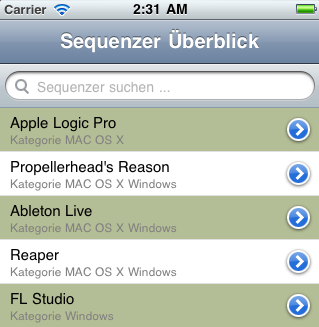
So sieht der TableView am Ende aus:
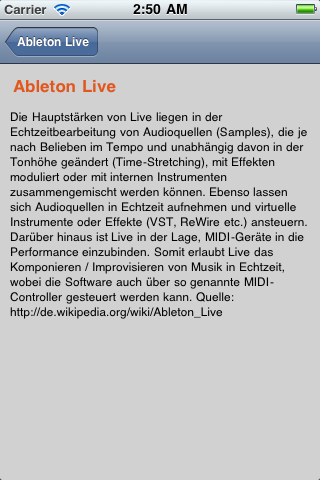
So sieht das DetailView am Ende aus:
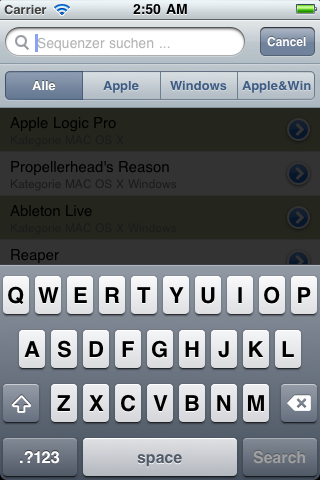
So sieht der SearchbarController am Ende aus:
Und das ist das zu parsende XML File:
<?xml version="1.0" encoding="UTF-8"?>
<sequenzer>
  <Produkt>
    <TitelText>Apple Logic Pro</TitelText>
    <Kurzbeschreibung>Bis zur Version „Logic 6“ wurde die Software von dem deutschen Unternehmen namens Emagic entwickelt.
    Apple übernahm Emagic im Jahr 2002 und stellte die Weiterentwicklung von Logic für das Betriebssystem Microsoft Windows ein.
    Seitdem ist Logic ausschließlich für Mac OS X erhältlich. Die letzte Version, die unter Windows betrieben werden kann, ist Logic 5.5.1.
    Während Version 6 noch den Namen Emagic trug, ist Logic seit Version 7 offiziell ein Apple-Produkt. Quelle: http://de.wikipedia.org/wiki/Logic_Pro</Kurzbeschreibung>
	<Kategorie>MAC OS X</Kategorie>
  </Produkt>
  <Produkt>
    <TitelText>Propellerhead's Reason</TitelText>
    <Kurzbeschreibung>Angefangen hat es bei der schwedischen Firma Propellerhead im Jahre 1997 mit dem Programm ReBirth RB-338, einer virtuellen
    Wiedergeburt der TB-303, TR-909 und des TR-808 von Roland. Drei Jahre zuvor hatte die Firma bereits den Loop-Editor ReCycle auf den Markt gebracht, damals noch unter der Obhut von Steinberg. Eigentlich sollte schon ReBirth ein komplettes virtuelles Studio werden. Laut Ernst Nathorst-Böös, einem der drei Gründungsväter von Propellerhead, war damals die Computerleistung einfach noch nicht ausreichend. Außerdem bestand die Firma zu dem Zeitpunkt tatsächlich nur aus drei Leuten. Quelle: http://de.wikipedia.org/wiki/Reason_(Software)</Kurzbeschreibung>
	<Kategorie>MAC OS X Windows</Kategorie>
  </Produkt>
  <Produkt>
    <TitelText>Ableton Live</TitelText>
    <Kurzbeschreibung>Die Hauptstärken von Live liegen in der Echtzeitbearbeitung von Audioquellen (Samples), die je nach Belieben im Tempo und unabhängig davon in der Tonhöhe geändert (Time-Stretching), mit Effekten moduliert oder mit internen Instrumenten zusammengemischt werden können. Ebenso lassen sich Audioquellen in Echtzeit aufnehmen und virtuelle Instrumente oder Effekte (VST, ReWire etc.) ansteuern. Darüber hinaus ist Live in der Lage, MIDI-Geräte in die Performance einzubinden. Somit erlaubt Live das Komponieren / Improvisieren von Musik in Echtzeit, wobei die Software auch über so genannte MIDI-Controller gesteuert werden kann. Quelle: http://de.wikipedia.org/wiki/Ableton_Live</Kurzbeschreibung>
	<Kategorie>MAC OS X Windows</Kategorie>
  </Produkt>
   <Produkt>
    <TitelText>Reaper</TitelText>
    <Kurzbeschreibung>Reaper unterstützt Mehrspuraufnahme und -Editing, MIDI-Aufnahme und -Editing, internen Non-Realtime-Downmix und spurweise Effekteinschleifung. Das Routingkonzept verzichtet auf spezielle Bus-, Aux- und MIDI-Spuren, jede Spur kann zugleich Audio- sowie Midi Daten enthalten. Mehrspurschnitt ist mittels Objektgruppierung ähnlich wie in Samplitude möglich. Dabei können einzelne Elemente als auch komplette Spuren gruppiert werden. Wie auch in anderen kommerziellen DAWs werden in REAPER Standard-Effekte wie EQs, Kompressoren und Hall mitgeliefert. Quelle: http://de.wikipedia.org/wiki/REAPER</Kurzbeschreibung>
	<Kategorie>MAC OS X Windows</Kategorie>
  </Produkt>
   <Produkt>
    <TitelText>FL Studio</TitelText>
    <Kurzbeschreibung>FL Studio (vormals Fruity Loops) ist ein Pattern-basierter Software-Sequenzer der Firma Image-Line Software. Das Programm bietet Möglichkeiten, sowohl Samples als auch Software-Synthesizer bzw. externe MIDI-Geräte zur Erzeugung eines Musikstückes zu benutzen. Zur Klangerzeugung dienen Samples, welche mit dem integrierten Sampler bearbeitet und abgespielt werden können, oder Synthesizer-Plugins, von denen einige grundlegende mitgeliefert werden. Es ist auch möglich, beliebige VST-Instrumente oder auch DirectX-Plugins hinzuzuziehen. Quelle: http://de.wikipedia.org/wiki/Fruity_Loops</Kurzbeschreibung>
	<Kategorie>Windows</Kategorie>
  </Produkt>
  </sequenzer>
Zuallererst starten wir ein neues Projekt in Xcode: File -> New Project und erstellen eine View-based Application.
ProduktViewController.h
//
// ProduktViewController.h

#import
#import "Produkt.h"

@interface ProduktViewController : UIViewController {

	IBOutlet UILabel *TitelText;
	IBOutlet UILabel *Kurzbeschreibung;
    IBOutlet UILabel *Kategorie;
	Produkt *myProdukt;
    IBOutlet UIScrollView *scroll;
}

@property (nonatomic, retain) UILabel *TitelText;
@property (nonatomic, retain) UILabel *Kurzbeschreibung;
@property (nonatomic, retain) UILabel *Kategorie;
@property (nonatomic, retain) Produkt *myProdukt;

@end
ProduktViewController.m
//
// ProduktViewController.m

#import "ProduktViewController.h"

@implementation ProduktViewController

@synthesize TitelText, Kurzbeschreibung, myProdukt, Kategorie;

 // The designated initializer.  Override if you create the controller programmatically and want to perform customization that is not appropriate for viewDidLoad.
- (id)initWithNibName:(NSString *)nibNameOrNil bundle:(NSBundle *)nibBundleOrNil {
    if (self == [super initWithNibName:nibNameOrNil bundle:nibBundleOrNil]) {
    }
    return self;
}

/*
// Implement loadView to create a view hierarchy programmatically, without using a nib.
- (void)loadView {
}
*/

// Implement viewDidLoad to do additional setup after loading the view, typically from a nib.
- (void)viewDidLoad {

    //Scrolling for Description View
    [scroll setScrollEnabled:YES];
    [scroll setContentSize:CGSizeMake(320, 500)];

	Kurzbeschreibung.text=myProdukt.Kurzbeschreibung;
	TitelText.text=myProdukt.TitelText;

    //Check, if this Node really contains a 'Kurzbeschreibung', if not set
    //'Keine Daten hinterlegt'
    if ([Kurzbeschreibung.text=myProdukt.Kurzbeschreibung isEqualToString:@""]) {Kurzbeschreibung.text=myProdukt.Kurzbeschreibung= @"(Keine Daten hinterlegt)";}

    [super viewDidLoad];
}

- (void)didReceiveMemoryWarning {
	// Releases the view if it doesn't have a superview.
    [super didReceiveMemoryWarning];

	// Release any cached data, images, etc that aren't in use.
}

- (void)viewDidUnload {
	// Release any retained subviews of the main view.
	// e.g. self.myOutlet = nil;
}

- (void)dealloc {
    [super dealloc];
}

-(BOOL)shouldAutorotateToInterfaceOrientation:(UIInterfaceOrientation)toInterfaceOrientation {
    if (toInterfaceOrientation == UIInterfaceOrientationPortrait)
        return YES;
    if (toInterfaceOrientation == UIInterfaceOrientationPortraitUpsideDown)
        return YES;
    if (toInterfaceOrientation == UIInterfaceOrientationLandscapeLeft)
        return NO;
    if (toInterfaceOrientation == UIInterfaceOrientationLandscapeRight)
        return NO;

    return YES;
}
@end
Produkt.h
//
// Produkt.h

#import

@interface Produkt : NSObject {

    NSString *TitelText;
    NSString *Kurzbeschreibung;
    NSString *Kategorie;
}

@property (nonatomic, retain) NSString *TitelText;
@property (nonatomic, retain) NSString *Kurzbeschreibung;
@property (nonatomic, retain) NSString *Kategorie;

@end
Produkt.m
//
// Produkt.m

#import "Produkt.h"

@implementation Produkt

@synthesize TitelText, Kurzbeschreibung, Kategorie;

@end
DataFileToObjectParser.h
//
// DataFileToObjectParser.h

#import

@interface XMLToObjectParser : NSObject  {

	NSString *NameOfClass;
	NSMutableArray *items;
	NSObject *item;
	NSString *CurrentNode;
	NSMutableString *CNodeContent;
}

- (NSArray *)items;

- (id)parseXMLAtURL:(NSURL *)url
		   toObject:(NSString *)aClassName
		 parseError:(NSError **)error;

@end
DataFileToObjectParser.m
//
// DataFileToObjectParser.m

#import "DataFileToObjectParser.h"

@implementation XMLToObjectParser

- (NSArray *)items
{
	return items;
}

- (id)parseXMLAtURL:(NSURL *)url
		   toObject:(NSString *)aClassName
		 parseError:(NSError **)error
{
	[items release];
	items = [[NSMutableArray alloc] init];
	NameOfClass = aClassName;

    NSXMLParser *parser = [[NSXMLParser alloc] initWithContentsOfURL:url];

	[parser setDelegate:self];

	[parser parse];

	if([parser parserError] && error) {
		*error = [parser parserError];
	}
    [parser release];
	return self;
}

- (void)parser:(NSXMLParser *)parser
didStartElement:(NSString *)element
  namespaceURI:(NSString *)namespaceURI
 qualifiedName:(NSString *)qName
	attributes:(NSDictionary *)attributeDict
{
	if([element isEqualToString:NameOfClass]) {
		item = [[NSClassFromString(NameOfClass) alloc] init];
	}
	else {
		CurrentNode = [element copy];
		CNodeContent = [[NSMutableString alloc] init];
	}
}

- (void)parser:(NSXMLParser *)parser
 didEndElement:(NSString *)element
  namespaceURI:(NSString *)namespaceURI
 qualifiedName:(NSString *)qName

{
	if([element isEqualToString:NameOfClass]) {
		[items addObject:item];
		[item release];
		item = nil;
	}
	else if([element isEqualToString:CurrentNode]) {
		[item setValue:CNodeContent forKey:element];

		[CNodeContent release];
		CNodeContent = nil;

		[CurrentNode release];
		CurrentNode = nil;
	}
}

- (void)parser:(NSXMLParser *)parser
foundCharacters:(NSString *)string
{
	[CNodeContent appendString:string];
}

- (void)dealloc
{
	[items release];
	[super dealloc];
}

@end
RootViewController.h
//
// RootViewController.h

@interface RootViewController : UITableViewController {

    NSMutableArray *tabelle; // Complete full Array
    NSMutableArray	*filteredListContent; // Array for the Searchresult

    //Activity Indicator
    IBOutlet UIActivityIndicatorView *XMLactivity;

    NSString		*savedSearchTerm;
    NSInteger		savedScopeButtonIndex;
    BOOL			searchWasActive;
}

@property (nonatomic, retain) IBOutlet UIActivityIndicatorView *XMLactivity;
@property (nonatomic, retain) NSMutableArray *tabelle;
@property (nonatomic, retain) NSMutableArray *filteredListContent;
@property (nonatomic, copy) NSString *savedSearchTerm;
@property (nonatomic) NSInteger savedScopeButtonIndex;
@property (nonatomic) BOOL searchWasActive;

@end
RootViewController.m
//
// RootViewController.m

#import "RootViewController.h"
#import "DataFileToObjectParser.h"
#import "Produkt.h"
#import "ProduktViewController.h"

@implementation RootViewController

@synthesize XMLactivity, tabelle, filteredListContent, savedSearchTerm, savedScopeButtonIndex, searchWasActive;

- (void)viewDidLoad {

    self.navigationItem.title = @"Sequenzer Überblick";

    //Start Activity Indicator, while XML is loading
    XMLactivity = [[UIActivityIndicatorView alloc] initWithFrame:CGRectMake(140.0f, 290.0f, 40.0f, 40.0f)];
    [XMLactivity setActivityIndicatorViewStyle:UIActivityIndicatorViewStyleGray];

    //Activity View show
    [self.view addSubview:XMLactivity];

    //Animation start
    [XMLactivity startAnimating];

    //XML parsen
    [self performSelector: @selector(doXMLParsing)
               withObject: nil
               afterDelay: 0];
    return;
}

- (void) doXMLParsing
{
    //start new Thread

    // create a filtered list that will contain products for the search results table
	self.filteredListContent = [NSMutableArray arrayWithCapacity:[self.tabelle count]];

	// restore search settings if they were saved in didReceiveMemoryWarning.
    if (self.savedSearchTerm)
	{
        [self.searchDisplayController setActive:self.searchWasActive];
        [self.searchDisplayController.searchBar setSelectedScopeButtonIndex:self.savedScopeButtonIndex];
        [self.searchDisplayController.searchBar setText:savedSearchTerm];

        self.savedSearchTerm = nil;
    }

	self.tableView.scrollEnabled = YES;

	tabelle = [[NSMutableArray alloc] init];

	NSURL *url = [NSURL URLWithString: @"https://devmarc.de/wp-content/temp_Tool_Update/jb_test/Sequenzer.xml"];
	XMLToObjectParser *myParser = [[XMLToObjectParser alloc] parseXMLAtURL:url toObject:@"Produkt" parseError:nil];

	for(int i = 0; i < [[myParser items] count]; i++) { 		Produkt *new = [[Produkt alloc] init]; 		new = (Produkt *)[[myParser items] objectAtIndex:i]; 		[tabelle addObject:new];         [new release];                  [self.tableView reloadData];     }     //Activity Indicator stop     [XMLactivity stopAnimating];     [XMLactivity release]; }      /* - (void)viewWillAppear:(BOOL)animated {     [super viewWillAppear:animated];      } */ /* - (void)viewDidAppear:(BOOL)animated {     [super viewDidAppear:animated]; } */ /* - (void)viewWillDisappear:(BOOL)animated { 	[super viewWillDisappear:animated]; } */ - (void)viewDidDisappear:(BOOL)animated { 	//[super viewDidDisappear:animated];  // save the state of the search UI so that it can be restored if the view is re-created  self.searchWasActive = [self.searchDisplayController isActive];  self.savedSearchTerm = [self.searchDisplayController.searchBar text];  self.savedScopeButtonIndex = [self.searchDisplayController.searchBar selectedScopeButtonIndex]; } /*  // Override to allow orientations other than the default portrait orientation. - (BOOL)shouldAutorotateToInterfaceOrientation:(UIInterfaceOrientation)interfaceOrientation { 	// Return YES for supported orientations. 	return (interfaceOrientation == UIInterfaceOrientationPortrait); }  */ - (void)didReceiveMemoryWarning { 	// Releases the view if it doesn't have a superview.     [super didReceiveMemoryWarning]; 	 	// Release any cached data, images, etc that aren't in use. } - (void)viewDidUnload { 	// Release anything that can be recreated in viewDidLoad or on demand.     self.filteredListContent = nil; } #pragma mark Table view methods - (NSInteger)numberOfSectionsInTableView:(UITableView *)tableView {     return 1; } // Customize the number of rows in the table view. - (NSInteger)tableView:(UITableView *)tableView numberOfRowsInSection:(NSInteger)section {          if (tableView == self.searchDisplayController.searchResultsTableView) 	{         return [self.filteredListContent count];     } 	else 	{         return [tabelle count];     } } // Customize the appearance of table view cells. - (UITableViewCell *)tableView:(UITableView *)tableView cellForRowAtIndexPath:(NSIndexPath *)indexPath {     static NSString *CellIdentifier = @"Cell";     UITableViewCell *cell = [tableView dequeueReusableCellWithIdentifier:CellIdentifier];     if (cell == nil) {                  cell = [[[UITableViewCell alloc] initWithStyle:UITableViewCellStyleSubtitle reuseIdentifier:CellIdentifier] autorelease];         cell.accessoryType = UITableViewCellAccessoryDetailDisclosureButton;              }     //Titeltext for TableView     NSString *TableText = [[NSString alloc] initWithFormat:@"%@", [[tabelle objectAtIndex:indexPath.row] TitelText]];     NSString *TableText2 = [[NSString alloc] initWithFormat:@"Kategorie %@", [[tabelle objectAtIndex:indexPath.row] Kategorie]];          //Search     Produkt * new = nil; 	if (tableView == self.searchDisplayController.searchResultsTableView) 	{         new = [self.filteredListContent objectAtIndex:indexPath.row];         cell.textLabel.text = new.TitelText;         cell.detailTextLabel.text = new.Kategorie;                  cell.textLabel.numberOfLines = 1;         cell.detailTextLabel.numberOfLines = 1;                  cell.textLabel.font = [UIFont fontWithName:@"Helvetica" size:15.0];         cell.detailTextLabel.font = [UIFont fontWithName:@"Helvetica" size:12.0];     } 	else 	{         new = [self.tabelle objectAtIndex:indexPath.row];         cell.textLabel.text=TableText;	         cell.detailTextLabel.text = TableText2;                  cell.textLabel.numberOfLines = 1;         cell.detailTextLabel.numberOfLines = 1;                  cell.textLabel.font = [UIFont fontWithName:@"Helvetica" size:15.0];         cell.detailTextLabel.font = [UIFont fontWithName:@"Helvetica" size:12.0];     }     return cell; } //Background for the Cells - (void)tableView:(UITableView *)tableView willDisplayCell:(UITableViewCell *)cell forRowAtIndexPath:(NSIndexPath *)indexPath {     UIColor *color = ((indexPath.row % 2) == 0) ? [UIColor colorWithRed:180.0/255 green:190.0/255 blue:150.0/255 alpha:1] : [UIColor clearColor];     cell.backgroundColor = color; } //Activate the Arrows -(void)tableView:(UITableView *)tableView accessoryButtonTappedForRowWithIndexPath:(NSIndexPath *)indexPath {     ProduktViewController *produktViewController = [[ProduktViewController alloc] initWithNibName:@"ProduktView" bundle:nil]; 	if (tableView == self.searchDisplayController.searchResultsTableView) 	{         produktViewController.myProdukt=[filteredListContent objectAtIndex:indexPath.row];         self.navigationItem.title=[[filteredListContent objectAtIndex:indexPath.row] TitelText];     } 	else 	{         produktViewController.myProdukt=[tabelle objectAtIndex:indexPath.row];         self.navigationItem.title=[[tabelle objectAtIndex:indexPath.row] TitelText];     }      	[self.navigationController pushViewController:produktViewController animated:YES]; 	[ProduktViewController release]; }  // Override to support row selection in the table view. - (void)tableView:(UITableView *)tableView didSelectRowAtIndexPath:(NSIndexPath *)indexPath {     // Navigation logic may go here -- for example, create and push another view controller.          /*     If the requesting table view is the search display controller's table view, configure the next view controller using the filtered content, otherwise use the main list.     */      	ProduktViewController *produktViewController = [[ProduktViewController alloc] initWithNibName:@"ProduktView" bundle:nil]; 	if (tableView == self.searchDisplayController.searchResultsTableView) 	{         produktViewController.myProdukt=[filteredListContent objectAtIndex:indexPath.row];         self.navigationItem.title=[[filteredListContent objectAtIndex:indexPath.row] TitelText];     } 	else 	{         produktViewController.myProdukt=[tabelle objectAtIndex:indexPath.row];         self.navigationItem.title=[[tabelle objectAtIndex:indexPath.row] TitelText];     }      	[self.navigationController pushViewController:produktViewController animated:YES]; 	[ProduktViewController release]; } - (void)filterContentForSearchText:(NSString*)searchText scope:(NSString*)scope { 	/* 	 Update the filtered array based on the search text and scope. 	 */ 	 	[self.filteredListContent removeAllObjects]; // First clear the filtered array. 	 	/* 	 Search the main list for Produkts whose type matches the scope (if selected) and whose name matches searchText; add items that match to the filtered array. 	 */          for (Produkt *new in tabelle) 	{         //Kategorie -> Windows
		if ([scope isEqualToString:@"Windows"] && [new.Kategorie isEqualToString:@"Windows"])

		{
			NSRange result = [new.TitelText rangeOfString:searchText options:(NSCaseInsensitiveSearch|NSDiacriticInsensitiveSearch)];

            if (result.location != NSNotFound)
            {
                [self.filteredListContent addObject:new];
            }
        }

        //Kategorie -> Apple
       if ([scope isEqualToString:@"Apple"] && [new.Kategorie isEqualToString:@"MAC OS X"])

		{
			NSRange result = [new.TitelText rangeOfString:searchText options:(NSCaseInsensitiveSearch|NSDiacriticInsensitiveSearch)];

            if (result.location != NSNotFound)
            {
                [self.filteredListContent addObject:new];
            }
        }

        //Kategorie -> Apple, Windows
        if ([scope isEqualToString:@"Apple&Win"] && [new.Kategorie isEqualToString:@"MAC OS X Windows"])

		{
			NSRange result = [new.TitelText rangeOfString:searchText options:(NSCaseInsensitiveSearch|NSDiacriticInsensitiveSearch)];

            if (result.location != NSNotFound)
            {
                [self.filteredListContent addObject:new];
            }
        }

        //All
        if ([scope isEqualToString:@"Alle"])

		{
			NSRange result = [new.TitelText rangeOfString:searchText options:(NSCaseInsensitiveSearch|NSDiacriticInsensitiveSearch)];

            if (result.location != NSNotFound)
            {
                [self.filteredListContent addObject:new];
            }
        }
    }
}

- (BOOL)searchDisplayController:(UISearchDisplayController *)controller shouldReloadTableForSearchString:(NSString *)searchString
{
    [self filterContentForSearchText:searchString scope:
     [[self.searchDisplayController.searchBar scopeButtonTitles] objectAtIndex:[self.searchDisplayController.searchBar selectedScopeButtonIndex]]];

    // Return YES to cause the search result table view to be reloaded.
    return YES;
}

- (BOOL)searchDisplayController:(UISearchDisplayController *)controller shouldReloadTableForSearchScope:(NSInteger)searchOption
{
    [self filterContentForSearchText:[self.searchDisplayController.searchBar text] scope:
    [[self.searchDisplayController.searchBar scopeButtonTitles] objectAtIndex:searchOption]];

    // Return YES to cause the search result table view to be reloaded.
    return YES;
}

-(BOOL)shouldAutorotateToInterfaceOrientation:(UIInterfaceOrientation)toInterfaceOrientation {
    if (toInterfaceOrientation == UIInterfaceOrientationPortrait)
        return YES;
    if (toInterfaceOrientation == UIInterfaceOrientationPortraitUpsideDown)
        return YES;
    if (toInterfaceOrientation == UIInterfaceOrientationLandscapeLeft)
        return NO;
    if (toInterfaceOrientation == UIInterfaceOrientationLandscapeRight)
        return NO;

    return YES;
}

- (void)dealloc {
	[tabelle release];
    [filteredListContent release];
    [super dealloc];
}

@end
Appdelegate.h
//
// Appdelegate.h

@interface Appdelegate : NSObject  {

    UIWindow *window;
    UIView *MainView;
    UINavigationController *navigationController;
}

@property (nonatomic, retain) IBOutlet UIView *MainView;
@property (nonatomic, retain) IBOutlet UIWindow *window;
@property (nonatomic, retain) IBOutlet UINavigationController *navigationController;

@end
Appdelegate.m
//
// Appdelegate.m

#import "Appdelegate.h"
#import "RootViewController.h"

@implementation Appdelegate

@synthesize window, navigationController, MainView;

- (void)applicationDidFinishLaunching:(UIApplication *)application {
    // Override point for customization after app launch
    [window makeKeyAndVisible];
}

- (void)applicationWillTerminate:(UIApplication *)application {
	// Save data if appropriate
}

#pragma mark -
#pragma mark Memory management

- (void)dealloc {
	[navigationController release];
	[window release];
	[super dealloc];
}

@end
Es existieren 3 Nib Files:
Window.xib
RootViewcontroller.xib
Produktview.xib
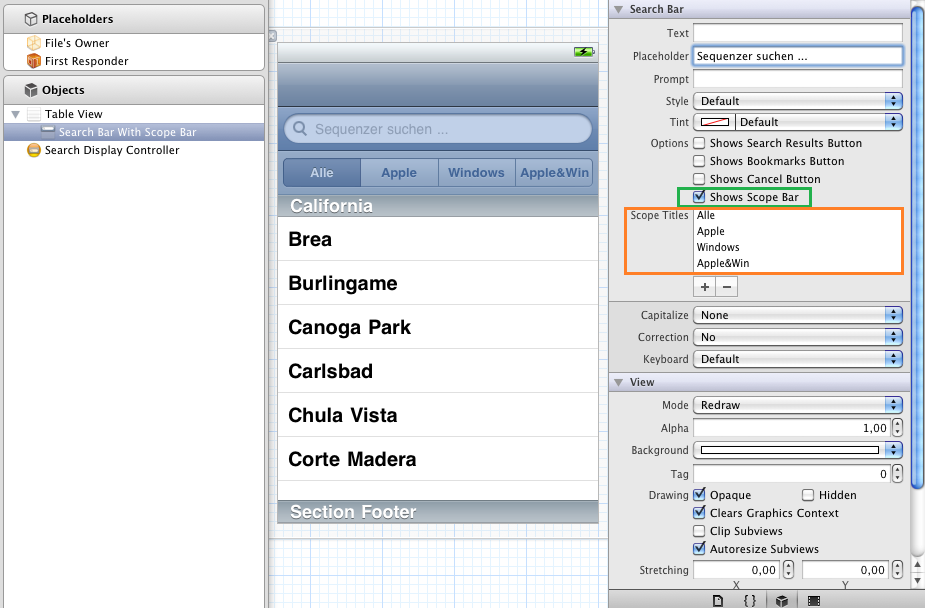
Holt euch die entsprechenenden Elemente wie z.b. das TableView Element und setzt die Verbindungen im Interfacebuilder mithilfe der Screenshots:
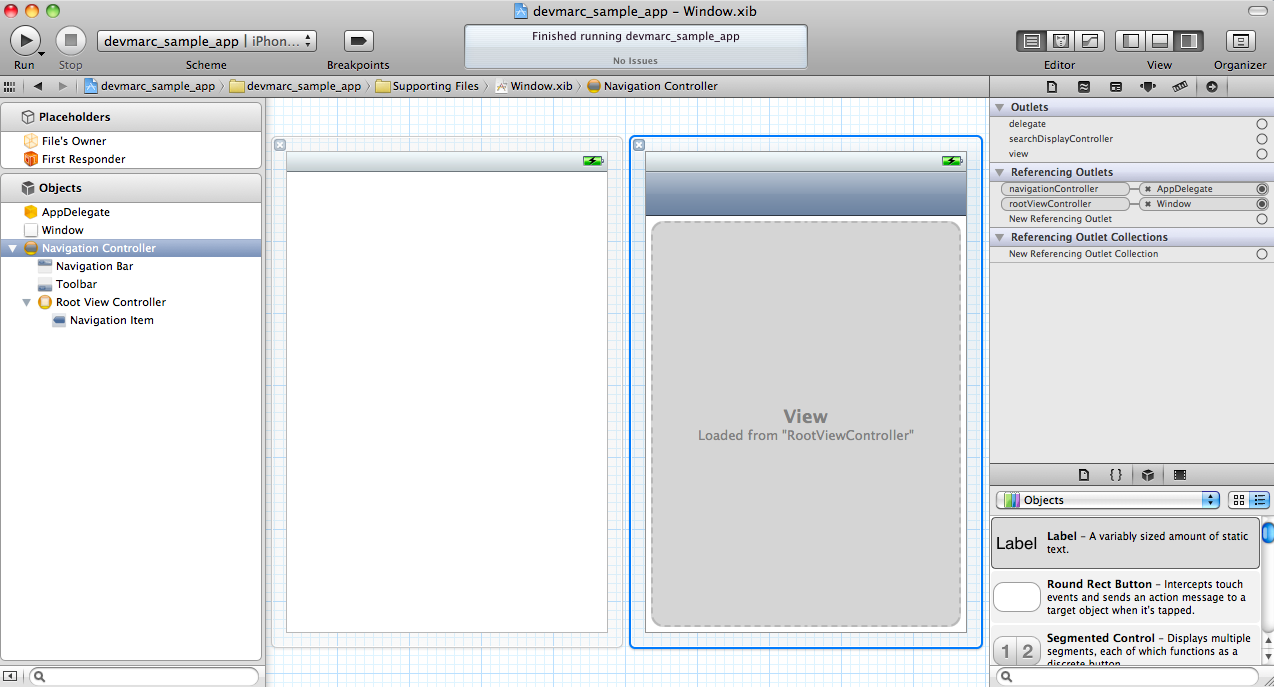
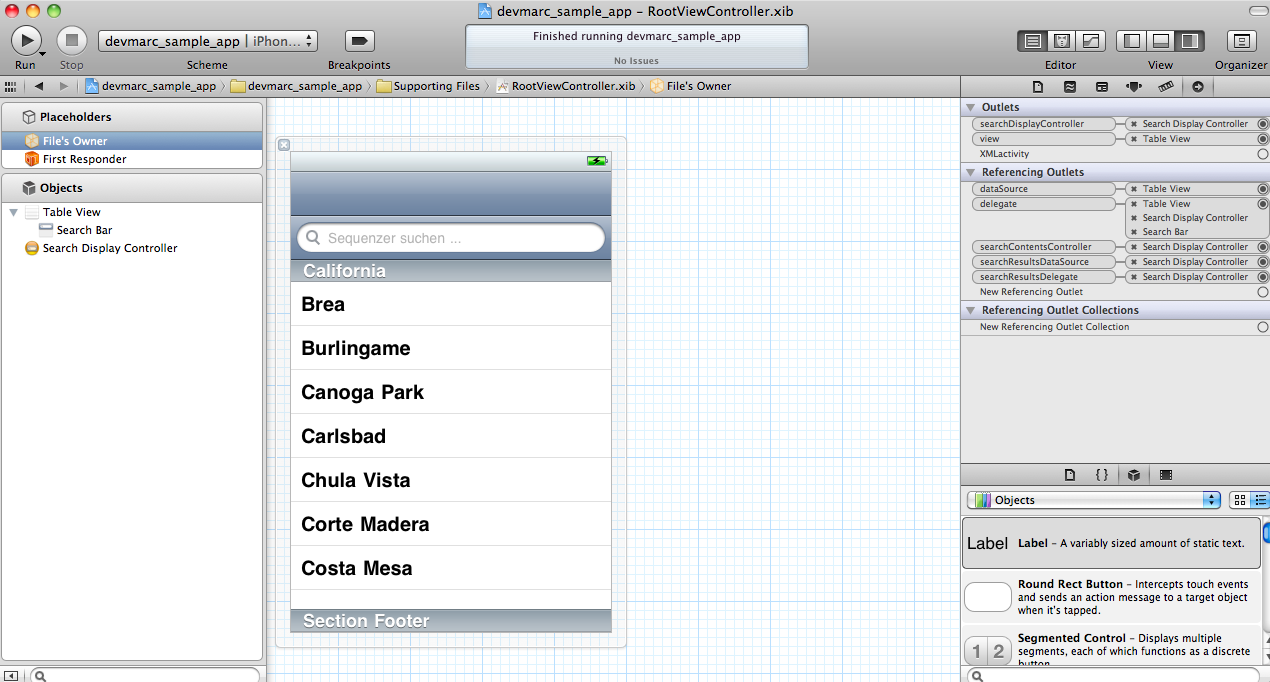
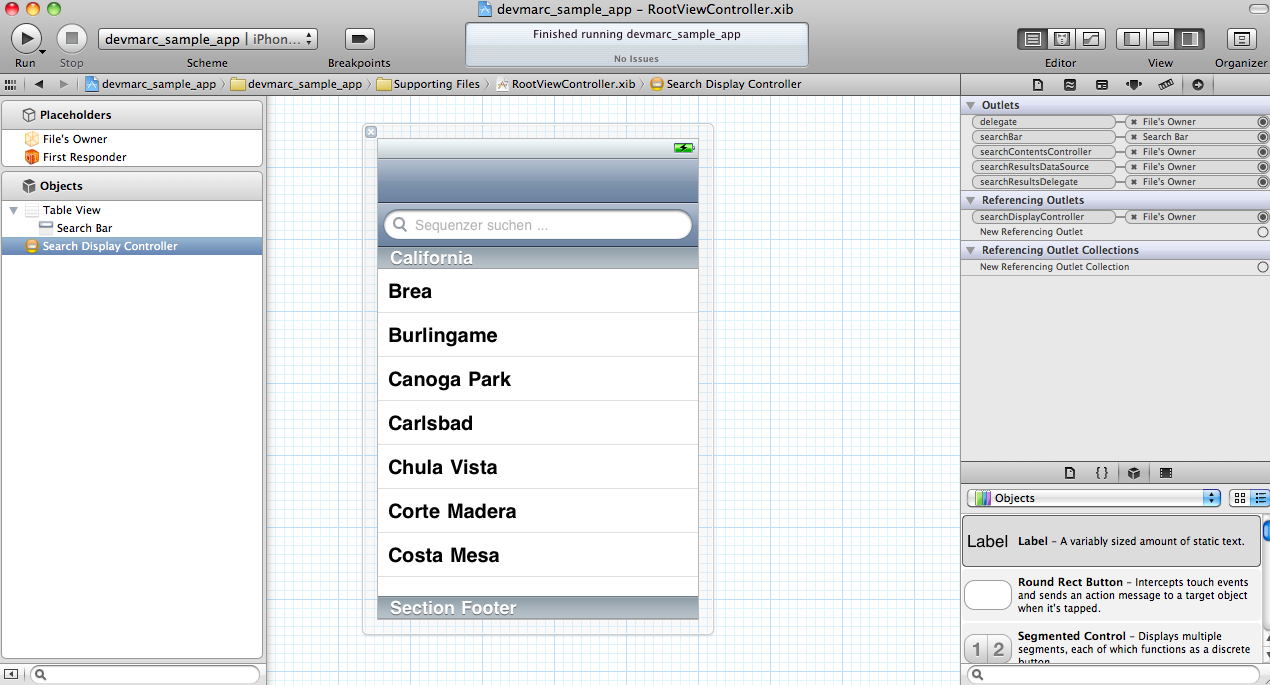
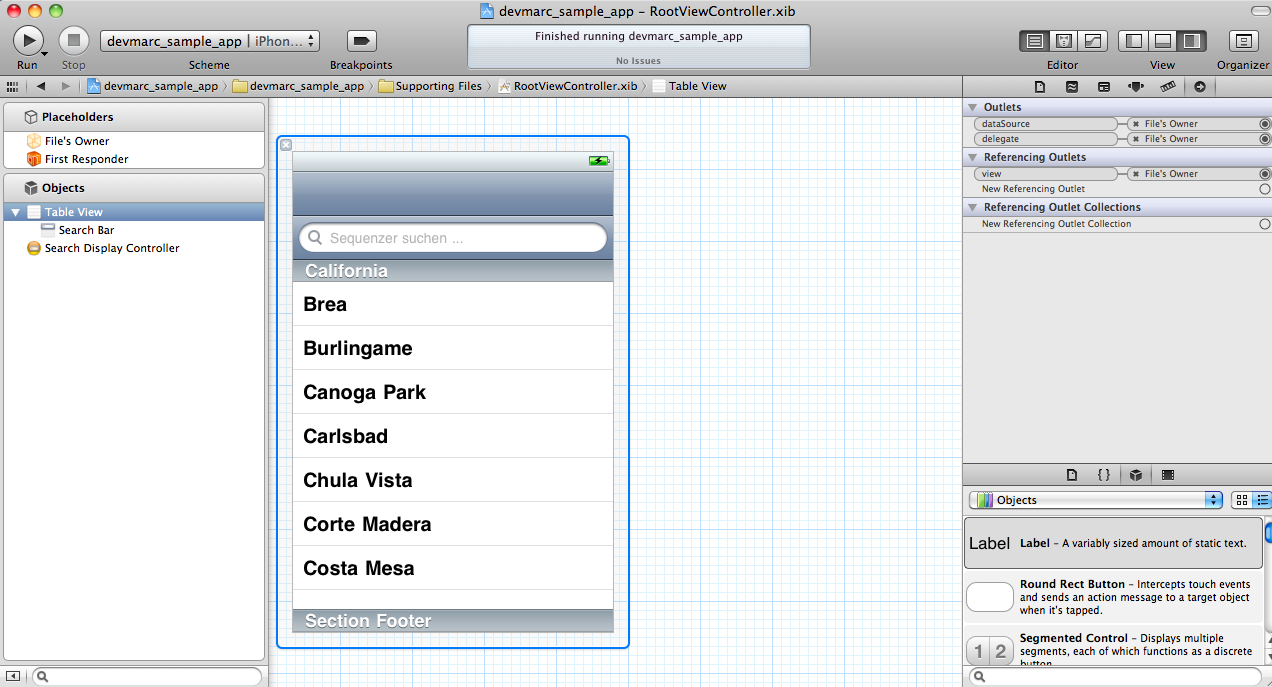
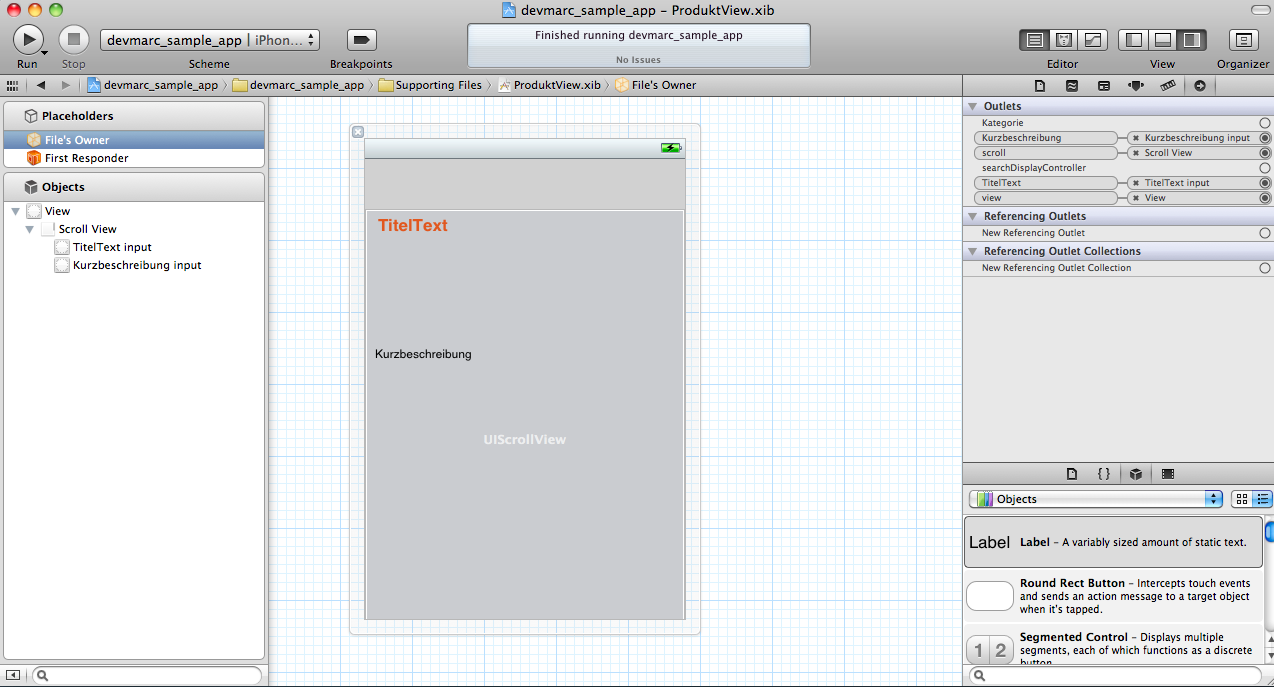
Aktiviert “Shows Scope Bar” um die entsprechenenden Scope Titles hinzufügen zu können.
Solltet ihr weitere Erklärungen wünschen, schreibt das bitte in die Kommentare.
8 replies on “Xcode iOS TableView, Searchbar, XML Parsing – Developer Tutorial”
Hi!
Kann man den Code auch downloaden weil bei mir funktioniert da etwas nicht mit Xcode 4.2!
Ich bitte darum sehr dringend!
mfg
Gert
Was kommt denn für eine Fehlermeldung?
Ein Download wäre bei der Fehlersuche schon extrem Hilfreich! Danke!
Mich würden eher eure Fehlermeldungen interessieren ^^ Der Sample Code ist jetzt am Ende des Artikels als Download angefügt.
Vielen Dank für das Tutorial. Es hat mir schon einiges weiter geholfen.
Mich interessiert, wie man noch ein Produkt-Foto in die DetailView bekommt, wenn der Name bzw. URL des Fotos in der XML-Datei steht.
Hallo kannst du das vielleicht updaten für Xcode 4.2.1 das man, dass man das anstatt mit der AppleDelegate nur mit den ViewController Dateien machen kann? Weil dann kann man das in dem Storyboard auch verwenden.
Könntest du mir bitte helfen?
Es ist ein bisschen dringend…
Mit freundlichen Grüßen
Thomas
PS. Bitte antworte mir egal mit was für einer Nachricht.
The best and most complete tutorial on combining a scoped search with NSXMLParser…absolutely awesome stuff!!
Super Tutorial, danke!
Mir stellt sich nun aber noch folgendes Problem: Leider werden die geladenen Daten nur dann angezeigt werden, wenn auch tatsächlich eine Netzverbindung besteht. Hat jemand einen Tipp, wie man die xml Daten lokal speichern könnte und jedes Mal bei Starten via Internet aktualisieren könnte?
Besten Dank für jegliche Ratschläge.